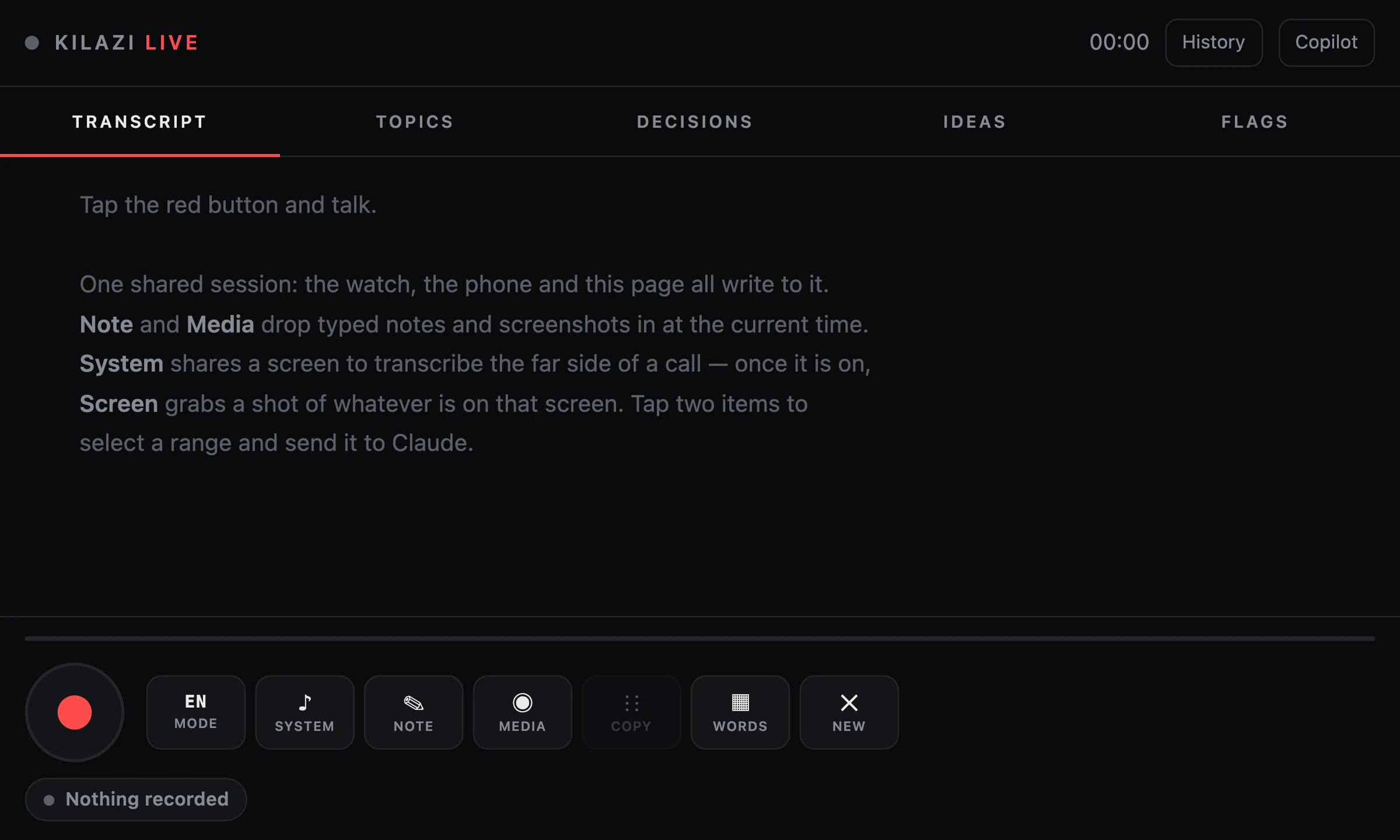
Two hours into a call, I asked for five minutes off-topic and told the other side what they were looking at on my shared screen: "kind of a presentation of a meeting which writes itself."
"So send us that."
I said it was half-built. They didn't blink. "That's all right, I'm intrigued."
That page was being written live by a Claude Code session (Anthropic's coding agent) on my laptop, reading our transcript every minute and posting takes, risks, numbers and ideas while we talked. It's the newest layer of Kilazi Live, a tool that started as a flop.
It started as a terminal nobody looked at
The first version was a command: hq call-assist. It recorded in 8-second chunks, transcribed them, and every 60 seconds printed "smart context" into a terminal. On paper, a copilot.
In practice, it wasn't super useful. A terminal is the last place my eyes go during a call. Its sibling, hq call-record, was worse: raw audio and nothing else. A 29-minute call became a 333 MB WAV that nobody would ever play.
But one part stuck. It caught everything. So I stopped making it smart and made it a net. Every call goes through it now. The former gimmick is the one tool I open before I say "hi, can you hear me?"
How does live call transcription work, step by step?
Live call transcription works by cutting audio into short speech segments, sending each one to a speech model, and stitching the text back in order on a shared page. Mine adds a vocabulary, tags and a brain.
- 1. CatchA voice detector cuts a segment after 700 ms of silence or 10 s of talking. The mic is me; a separate System chain hears the other side through the browser's screen-share audio.
- 2. TranscribeEach segment goes to the speech model with a vocabulary of about 100 names and terms, chosen for this call. Non-English lines get an English translation underneath.
- 3. TagA fast decision model called Jev (it answers with a label and a probability, not prose) marks each line: decision, task, idea, note to self, or asked you. Voice fingerprints label who is talking.
- 4. ThinkA Claude Code session on my laptop reads new lines every minute and rewrites a copilot page on kilazi.com. The page refreshes itself every 8 seconds.
- 5. WrapOne tap on Build PDF report. A server renders thesis, decisions, action items and open questions, and a link to the PDF lands in my WhatsApp.
Before the split, with headphones on, only my half of every call existed. My mic and the other side's audio arrive at wildly different volumes; mixed together, the loud one drowns the quiet one. So they stay on separate chains.
Can AI transcription get names and jargon right?
Yes, if you hand it a vocabulary instead of praying. On one real call, the old model got a product name wrong 4 times out of 4.
So Live builds a dictionary from my past calls in Kortex, my memory system: ten clusters of names and terms. At the start of each call, Jev scores which clusters fit, from the calendar and the latest lines, and hands about 100 terms to the transcriber. Newer model plus a keyword list, same audio: 8 right, 0 wrong. It still hears my own Kortex as "this cortex", so Live also rewrites known mishearings.
Three traps I paid for:
- Never feed the previous text back in as a hint. One misspelling propagates forever.
- Never pass a word list as a prompt to gpt-4o-transcribe. On 43 of 144 chunks it returned the word list as the transcript.
- Never ask the audio model to translate twice. It once heard "Después." and translated it as "I don't know if I can do it, it's not my thing." So Live has a translate mode: it transcribes once, in the original language, and translates the text with the lines before it as context.
A peer-reviewed study of Whisper found roughly 1% of transcriptions contained whole invented phrases. On a three-hour call, that's a lot of fiction with my name on it.
Why build an iPhone and Apple Watch app for this?
Because a web page can't record in your pocket: iOS Safari mutes the mic the moment it leaves the screen. So Live has native iPhone and Watch apps, writing into the same session as the laptop. Phone, wrist and browser see each other's lines land live.
The Watch is the honest one. It records with the screen off, it's perfect for talking at your wrist, and it quits for good on the first incoming call.
The phone had its own comedy. Background recording was dead for a week: the setting that enables it sat in a build option Xcode doesn't support, so Xcode quietly dropped it. The data gave it away: text stopped the second I pocketed the phone, while the photos I snapped in the app kept arriving. Photos only happen with the app on screen. Busted.
And since it runs on a free Apple account, every build expires in seven days. A background job re-signs it when the phone is plugged in and the build is getting old. Problem solved in the laziest possible way, which is the correct way.
What does an AI copilot page do during a call?
It thinks out loud next to you, so you can keep listening. A Claude Code session on my laptop runs a one-minute loop: read new transcript lines, write takes, publish.
The rules came from getting annoyed in real time:
not just lookup; voice your thoughts.
better miss something if you are not sure what it is rather than hallucinate.
Max
No scripts for me to read aloud. Ideas, each with a one-line why. Names and numbers only from the transcript or a linked source.
On that three-hour call, the page posted 52 takes (opinions, pushback, risks), 39 ideas to throw in and 17 numbers. Best moment: the talk turned to their data, and the session ran the numbers and posted the exact count, with the breakdown, before the other side pulled it up. Their verdict: "that's really good." Then the sharper one: "use it to sort of double check your work... What you don't want to do is take exact data and hand it off to a process that is not exact."
hq call-assist (then)
- 8-second chunks, one mic
- Terminal output every 60 s
- Transcript in a terminal, not on a page
- Read it later, maybe never
Kilazi Live (now)
- Laptop, iPhone and Watch in one session
- Vocabulary, translation, tags, speaker names
- A page that writes itself during the call
- A PDF report link in WhatsApp when it ends
It also failed the way only a live mic can. I explained the page to someone at home, and the loop dutifully published that as part of the call. Off-call speech now stays off.
The cost makes me grin. That call was 496 turns of Claude Opus, about $67 at API prices. On the subscription, it's just a normal day. (Why I run my whole agent fleet that way is its own story; why my brain needs this at all is in my ADHD workflow.)
And no, the live link doesn't get shared. If anyone gets the page, it's a stripped copy; the live one carries my private pushback on the people in the room. Some things a meeting shouldn't write about itself.
Want AI agents that actually ship?
I build AI agents and the systems around them for businesses: memory, voice, overnight rigs, and the boring guards that make them safe to leave alone.
Questions people ask
Can you transcribe both sides of a call in the browser?
Yes. The microphone gives you your own voice, and the browser's screen-share picker can hand over a Chrome tab's audio, which carries the other side of a web call. Keep them as two separate voice-detection chains instead of mixing them, because a close mic and a clean digital feed sit tens of decibels apart. On a Mac, desktop apps that aren't a browser tab usually need a loopback audio device.
How do you stop transcription from misspelling names and product terms?
Pass a short vocabulary of the correct spellings to a transcription model that accepts keywords, and pick that list per call from your own past calls. Then add a deterministic fix-up step that rewrites known mishearings to the right word. Don't feed the previous transcript back in as a hint: one wrong spelling then repeats for the rest of the call.
Does an AI copilot during calls cost a lot?
It depends on how you pay. One three-hour call with a Claude Code session updating a page every minute came to 496 turns, about $67 if billed at API prices. Run on a flat Claude subscription instead, the same work costs no extra money. A lighter, purpose-built API loop would cost a few dollars per call hour, by my estimate.
Can an Apple Watch record a meeting in the background?
Partly. watchOS lets an app keep recording after the screen turns off, but the recording has to be started in the foreground, and after an interruption such as a phone call or Siri it can't resume in the background. It works well for quick notes spoken at your wrist, less well as a meeting recorder for long calls.

Max Sergeev. Max builds AI agents and the systems around them: long-term memory, voice, overnight rigs, and the boring guards that make them safe to leave alone. He runs kilazi labs from Buenos Aires. kilazi.com
Sources
Read next
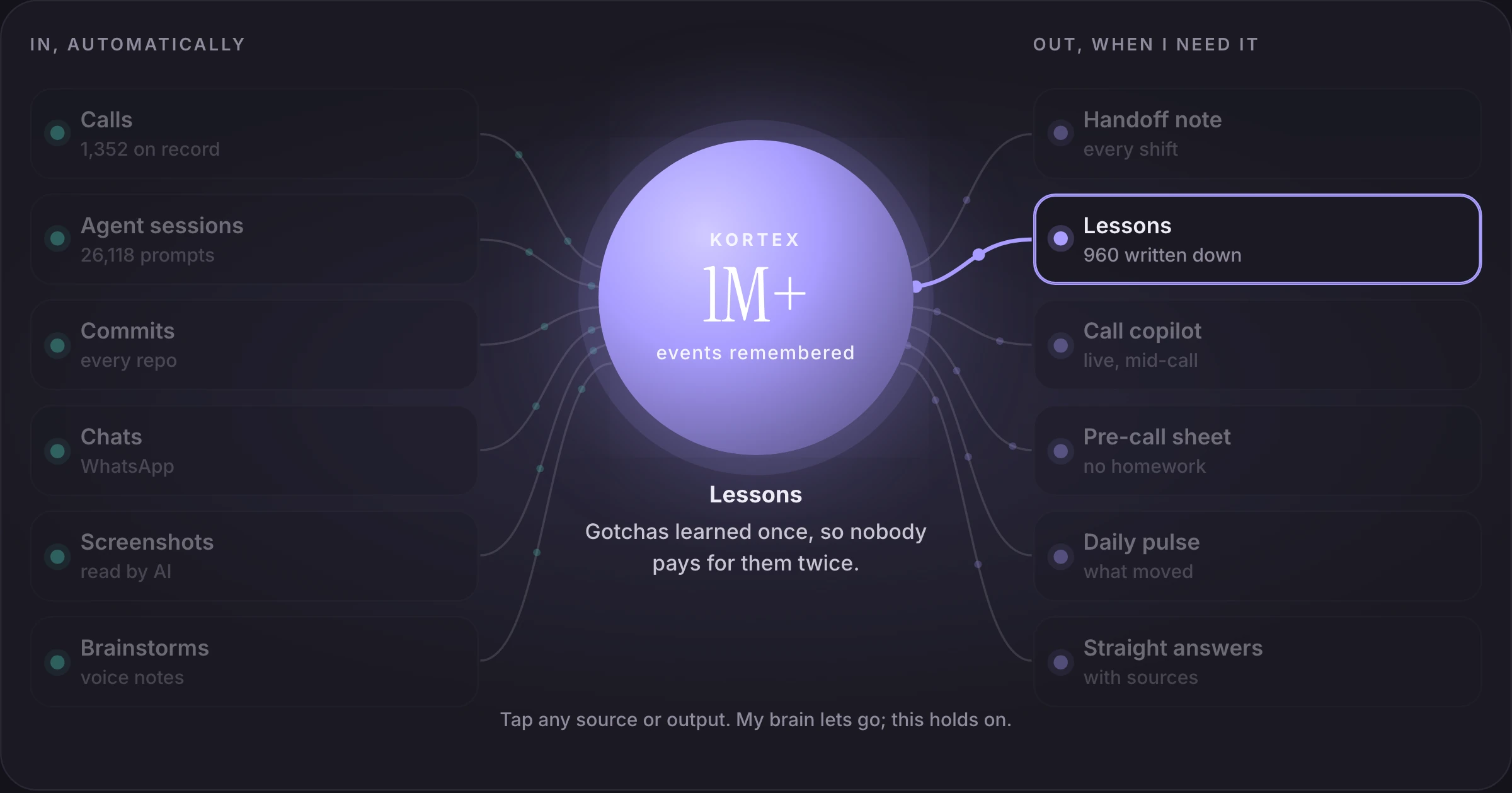 MemoryMy AI Second Brain: How MS and a Bad Memory Built KortexA brain that can't hold state built a system that holds it for him. Now the guy with the worst memory in the room walks in with the best one.Read it 2026
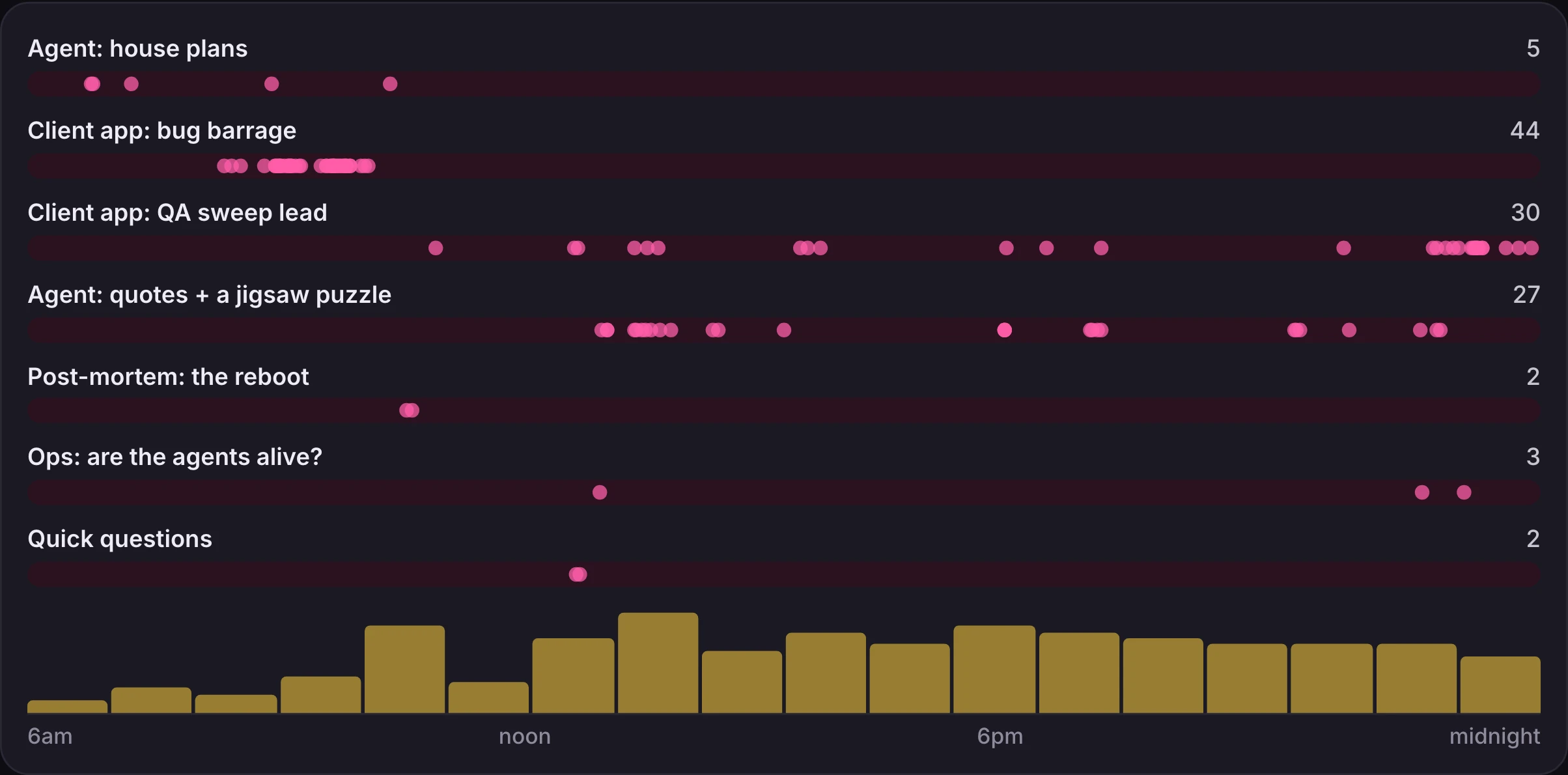 WorkflowMy "ADHD Workflow": Three Projects at Once, and AI Agents Hold the Context113 messages, 8 conversations, 31 jumps in one day. Why focus matters less once agents remember where you left off.Read it 2026
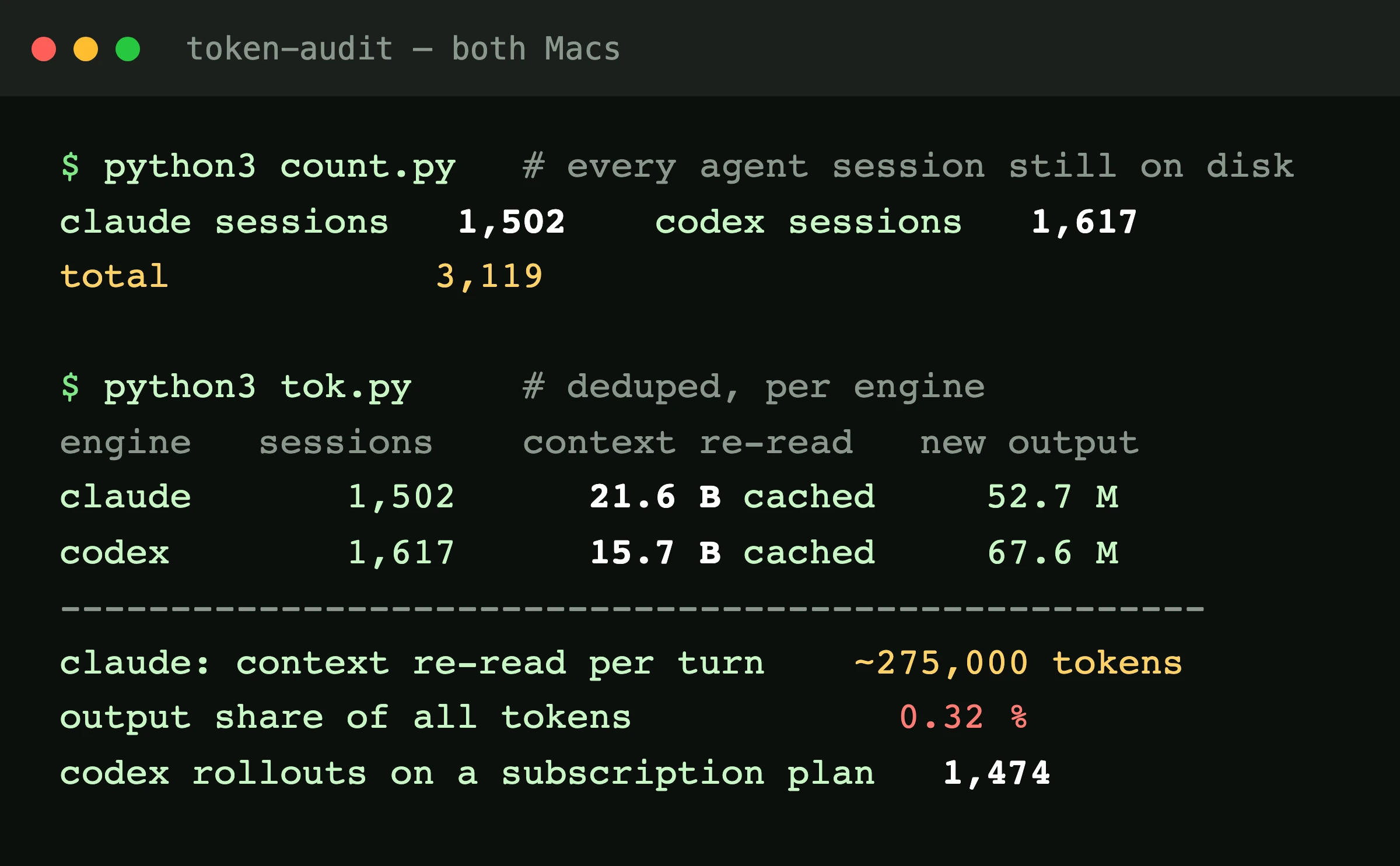 AI agents3,119 AI Agent Sessions on a Flat Subscription (and the $58 Afternoon)38 billion tokens read, 120 million written, one flat fee. Plus the afternoon a laptop slipped onto an API key.Read it 2026